

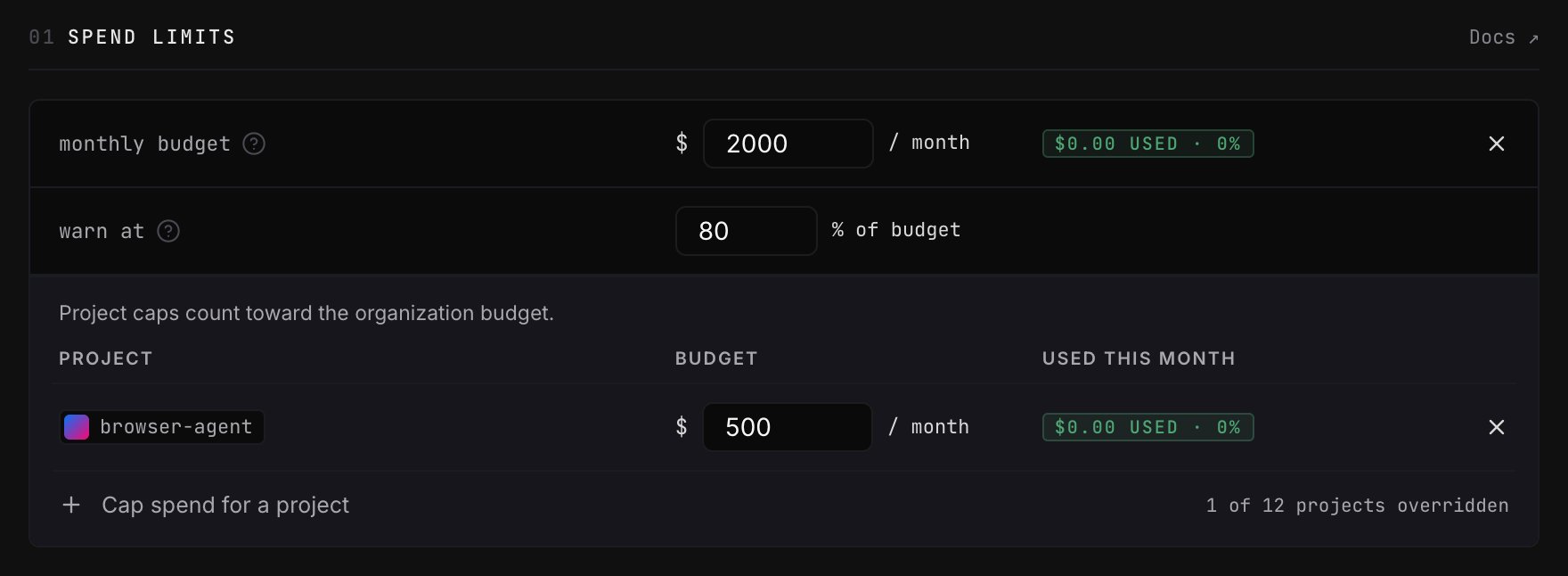
Set the monthly budget
The usage indicator shows current month-to-date spend:
- Green below the warning threshold
- Amber at or above the warning threshold
- Red at 100%
soft_limit_pct on the enabled organization-wide rule. Omit it or set it to
0 to disable the early warning. The alerts_enabled field currently has
no effect on delivery.
What happens when you reach a limit
The call that reaches or crosses the limit completes. Opper blocks the next call with HTTP 402 Payment Required, so final spend can be slightly higher than the configured amount. Budget limits reset at the start of each calendar month in UTC. Adding credit does not clear a budget block because the limit applies to spend, not account balance. To resume calls sooner, raise or remove the budget; Opper re-evaluates the block as soon as you save.A low account balance can also return HTTP 402. Adding credit clears a
balance-related block, but not a monthly budget block.
Add project caps
Select Cap spend for a project to limit one project’s monthly spend. Project usage counts toward the organization budget—it is not an additional allowance. When you save, Opper checks that:- The organization has at most one enabled monthly budget.
- Each project has at most one enabled project cap.
- Every project cap is less than or equal to the organization budget.
What counts toward a limit
Spend limits cover every billable model call, including:- LLM and embedding calls through the v3 API and compatibility gateway
- Image, speech, and video generation
- Judge calls made by score checks